Take a video call on a train. The connection comes and goes, and for a few weeks the video call app we published in October handled that the way most first versions do: the moment the browser reported the connection as dropped, the call was over, both of you were back in the waiting room, and a new call started at once. On a weak connection that meant being thrown out and pulled back in every few seconds, which is worse than a frozen picture. We fixed it, and the fix is not in the app alone. Most of it is in skapi-js 2.2.21, so every app built on Skapi's realtime connection and WebRTC calls gets it. This article explains what changed, with pictures, and ends with what it did for the video call app and what it means for yours.
Two connections, two jobs
A call made with Skapi runs on two connections, and it helps to keep them apart from the start.
Two connections with two jobs. The thin one is for finding each other; the thick one is the call.
The thin one is the realtime connection to Skapi, a WebSocket. It carries who is in the room and the handful of messages two browsers exchange to set a call up: the offer, the answer, the network addresses each side can be reached at. The thick one is the call itself, a WebRTC connection that runs straight from one browser to the other. Video, voice, the chat messages and the files travel on it. Skapi is not in the middle of it, and once the call is up it does not even need the thin line, except to set up a change later: a screen share, a new path.
A bad connection can break either of the two, or both. The improvements in 2.2.21 cover each.
What a drop used to do
Here is the sequence that produced the train experience.
The old sequence. A momentary state was treated as the end.
A WebRTC connection reports its state to the page, and one of those states is disconnected. It means "no packets for a few seconds". It is not the end of anything: browsers leave that state by themselves most of the time, when the packets start flowing again, and when they do not, a procedure called an ICE restart finds a new path, which is what a phone needs after moving from Wi-Fi to mobile data. The SDK used to close the connection the moment that state appeared. The app saw a closed call, did what it should for a closed call, and dialled again, because a lost call may be retried. On a connection that keeps blinking, that is a loop.
What happens now
The new sequence, in its two outcomes.
The SDK no longer closes a connection that says disconnected. It waits three seconds, because the browser often brings the connection back on its own within that time, then sends an ICE restart so the two browsers look for a path again. If the browser reports failed, one more restart goes out at once. Only when nothing has helped within fifteen seconds of the first report is the call given up, and then it is given up on both sides at the same moment, so neither page is left talking to nobody.
The page is told at each step, through the same callback it already uses for the call, with three events:
| Event | When |
|---|---|
reconnecting |
The connection dropped. The call is still open; show it, and keep the picture on the screen. |
reconnected |
The connection is back. Nothing else changed: the tracks, the data channels and the files in flight are the same. |
lost |
The connection could not be brought back. The call is closed right after. |
The one that matters most for an app is the third, because a lost call and a hang-up look the same from the outside: both end with a closed state. The lost event before the close is how a page tells them apart, and it is why the video call app can dial again after a loss and show a button after a hang-up.
The thin line reopens by itself
The realtime connection is a WebSocket, and a WebSocket on a phone closes whenever the network goes away for more than a moment. The SDK has always reconnected it, but it used to stop after a few tries, and an attempt that failed because the network was still down was the last one. A page that came out of a tunnel after a minute had no realtime connection and no way to get one back short of a reload.
The realtime connection comes back by itself, at a pace that does not hammer anything.
Now the attempts go on: the first three seconds after the close, then six, twelve and twenty-four seconds apart, then every thirty seconds, for as long as the page is open and the user is signed in. A page that is brought back to the foreground tries at once. The group the user was in is joined again on the first success, and the page hears reconnect before each attempt and success when one works, so it can say "Reconnecting..." and clear it. A call that is up goes on through all of this; it does not depend on the thin line.
A new address, the same call
There is a subtlety here that is worth a picture, because it is the part that makes the two improvements work together.
Every realtime connection has a connection id, and a call is addressed by the other side's id: when Ana's browser sends Ben's browser the offer, the answer or a new network address, it sends it to Ben's connection id. When Ben's realtime connection drops and reopens, the server gives it a new id. Ana does not know that. Her next message for Ben, an ICE restart for example, would go to an id that no longer exists, and the call that was about to be repaired would be lost after all.
The call keeps its name across a change of connection id.
So every signal of a call now names the call, with an id both sides share from the first offer. When Ben's connection reopens, his browser sends an empty signal to Ana: "call k7p2, still here", and it arrives from his new connection id. Ana's browser has never seen that id, but it has the call, so it learns that Ben is at the new id now and writes there from then on. The app hears a cidchange event with the new id and the old one. The call itself never noticed; it was running between the browsers the whole time.
Signed in through it all
One more piece, and it is not about connections at all. A Skapi session is kept alive by refreshing its sign-in token in the background, and a refresh needs the network. Before 2.2.21 a refresh that failed for any reason signed the user out, and "any reason" included "the request never reached the server". A long enough outage at the wrong moment ended with the user on the sign-in page, and with the realtime reconnect stopped, since there was no session left to reconnect with. For the video call app, whose accounts are anonymous and temporary, it meant a new account and a room that no longer knew the person.
Only an answer from the server ends a session now.
The two cases are told apart now. A refresh the server rejects, because the token is expired or revoked or the account is gone, signs the user out, as it should. A refresh that got no answer keeps the session and the token as they are; the request that needed it fails with the code NETWORK_ERROR, the way every request fails without network, and the next request refreshes again. Mail and banking apps on a phone have worked this way for years, and it is the only sensible way: a tunnel is not a reason to sign anyone out.
What it did for the video call app
The app is open source, and it is where all of this was tried first. Four things changed on the screen.
The call stays on the screen. When the connection drops, a "Reconnecting..." pill appears over the picture, the status dot pulses, the picture freezes, and a line in the chat says what is happening. Most of the time the next line is "Connected again." and nothing else happened. When the call is really lost, both pages go back to the waiting room, it says so, and a new call starts by itself.
The browser asks for the camera once. This one was a separate complaint, and the cause was separate too: the app opened the camera for the preview in the waiting room, stopped it when the call started, and the SDK opened it again for the call. Two captures, and in Firefox and Safari two permission prompts.
One opening of the camera for the whole visit.
Now the camera and the microphone are opened once, for the preview, and stay open for the visit. Each call sends a copy of those tracks, made with track.clone(), which never prompts; the SDK stops the copies when the call ends and the preview keeps the originals for the next one. This needed one small addition to the SDK: media.audio and media.video accept a MediaStreamTrack now, sent as the microphone or the camera without a new capture.
A pause before dialling again. When a call is lost, the waiting room waits a second before the next one, then two, four and eight seconds for losses in a row. A call that connects starts the count over. It is the difference between a page that tries again sensibly and one that hammers a dead connection.
The pauses after lost calls. Eight seconds is the most it ever waits.
The chat and the board survive. A lost call keeps the chat log and the drawing, and the next call with the same person goes on where it stopped: the log says "Mina is back." instead of starting empty, and the board opens again with the drawing on it. Only a hang-up on purpose starts a fresh call.
There is one more thing the app learned to do, and it is the kind of detail that only shows up on a real bad network. The room lists connections, not people, and the service learns that a connection died only when it tries to send to it. So for a while after someone's network dropped, the room can list that person twice: the dead connection and the new one. The app used to count two and call the room full. It counts people now, calls the newest connection of each, and when the service answers that a connection is gone, the entry goes and the call is dialled again to the one that is alive.
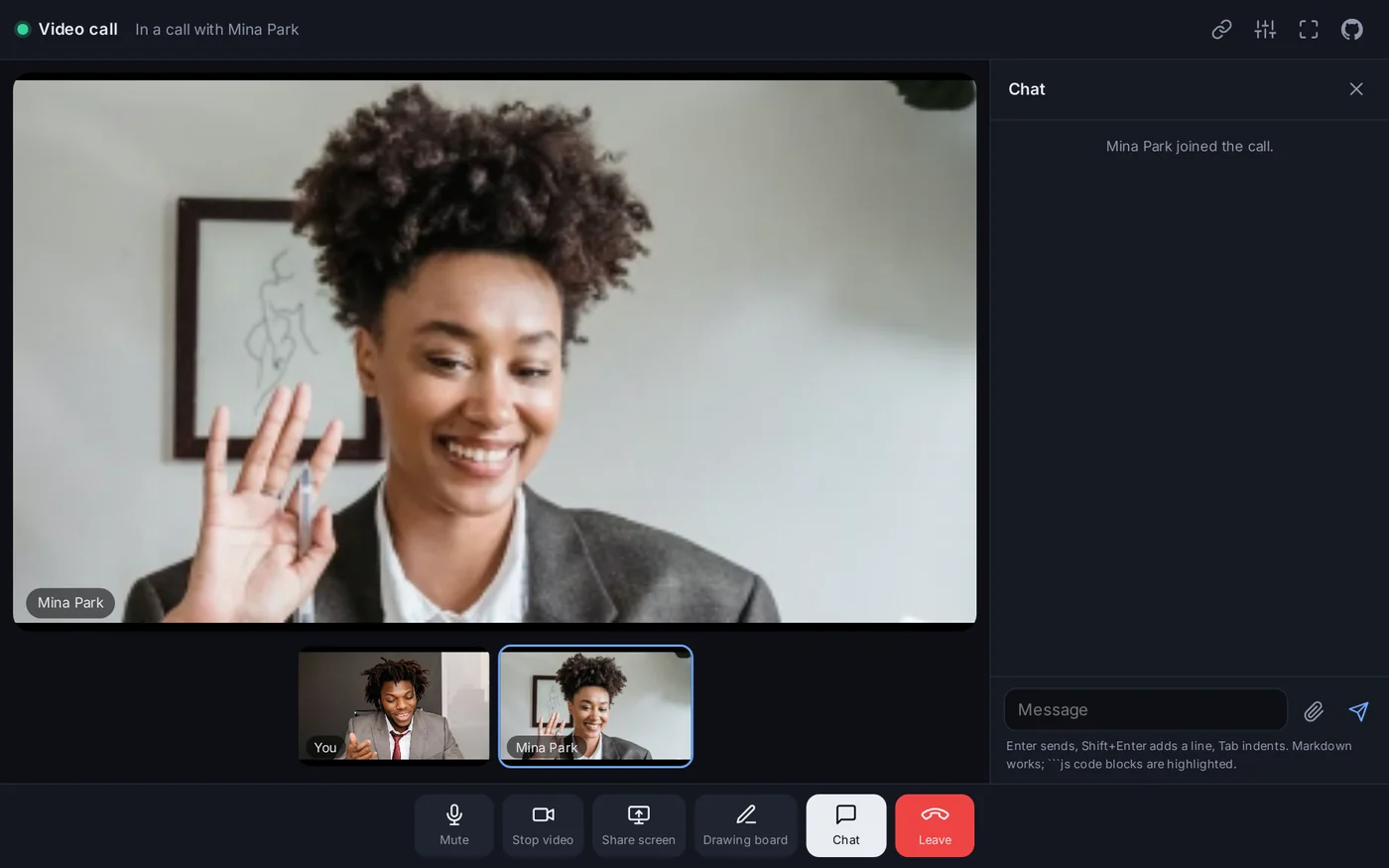
The app, at videocall.skapi.com. Free, no sign-up, and the source is on GitHub.
In your own app
Everything above comes with skapi-js 2.2.21 and needs no change on the server. If your app already ends a call only on the closed state, it gets the recovery for free and can ignore the new events. If it ends the call on disconnected, as the earlier docs example did, it should stop: that state is no longer the end, and a page that tears itself down on it would be showing "call ended" over a call that is about to come back. The pattern is short:
function RTCCallback(e) {
    switch (e.type) {
        case 'reconnecting':
            status.textContent = 'Reconnecting...';
            break;
        case 'reconnected':
            status.textContent = '';
            break;
        case 'lost':
            lost = true; // the closed that follows is not a hang-up
            break;
        case 'connectionstatechange':
            if (e.state === 'closed') endCall(lost);
            break;
    }
}
And for the realtime connection, one message per attempt:
let RealtimeCallback = (rt) => {
    if (rt.type === 'reconnect') status.textContent = 'Connection lost. Reconnecting...';
    if (rt.type === 'success') status.textContent = '';
};
The details are in the documentation: A dropped connection, Staying connected, the media option in What a call can carry, and the version history for 2.2.21.
A connection that blinks should be a frozen picture for a few seconds, not a call that ends. That is what it is now, for the video call app and for every app that makes calls on Skapi.